Showing posts with label x. Show all posts
Showing posts with label x. Show all posts
Friday, September 9, 2016
DOWNLOAD X BO FIRMWARE
DOWNLOAD X BO FIRMWARE

THIS ARE COLECTION OF SONY X-BO STOCK ROM / FIRMWARE
learn how to flash this device here
if u encounter any error in flash tool click here
verry important: tips to note before flashing mtk android phone click here
NOTE: Most X-BO phones are clones of other products so do not tick preloader & uboot in sp flash tool when using any of these firmwares (Except when the phone is totally dead)
It always good to make a backup of uboot.img or lk.img of XBO phones before flashing
Pls send any uboot.img or lk.img file you backup so I can post to help others
It always good to make a backup of uboot.img or lk.img of XBO phones before flashing
Pls send any uboot.img or lk.img file you backup so I can post to help others
If u ave blank screen after flashing the firmware .. restore the uboot.img or lk.img you backup
You can search this site x-bo display fix if you dont backup before
or make a request @ comment box
You can find various display fix files from here
You can search this site x-bo display fix if you dont backup before
or make a request @ comment box
You can find various display fix files from here
NEW X-BO FIRMWARE COLECTION CLICK HERE
X-BO B3
Chip - MT6572
DOWNLOADX-BO B5
Chip - MT6572
DOWNLOAD
X-BO B9
B9_MT6572_V1.02
DOWNLOAD
X-BO LION
X-BO LION
LION_MT6580_Android5.1
DOWNLOAD
X-BO N760
N760_MT6572_Android4.4
DOWNLOAD
Chip - MT6572
DOWNLOAD
X-BO M8
HTC.M8.CLONE_MT6572_Android4.2
DOWNLOAD
X-BO M9 MINI
X-BO M9+
M9+ Android4.4
DOWNLOADX-BO KIVI O1
KIVI_O1_MT6580_Android5.1
DOWNLOAD
DOWNLOAD
X-BO O2
O2_MT6580_Android5.1
DOWNLOAD
X-BO O3
O3_MT6580_Android5.1
DOWNLOAD
X-BO O5
Chip - MT6580
Password - xboo580
Password - xboo580
DOWNLOAD
X-BO KIVI O6
X-BO O7
O7__MT6580_Android5.1_V1.0.7
DOWNLOAD
X-BO Q11
X-BO S5
Android 5.1
MT6580
MT6580
DOWNLOAD
X-BO S7
Android 5.1
MT6580
MT6580
DOWNLOAD
X-BO S900
X900_MT6580_Android5.1
X900_MT6580_Android5.1
DOWNLOAD
X-BO Tiger
Android 5.1
Chip - MT6580
Android 5.1
Chip - MT6580
DOWNLOAD
X-BO V3+
X-BO V5
X-BO KIVI V5
KIVI_V5_MT6572_Android4.4.2
DOWNLOAD
X-BO V6
X-BO V7
Chip - MT6572
DOWNLOAD
X-BO V9
Thursday, September 8, 2016
X BO V3 Plus Firmware Download
X BO V3 Plus Firmware Download

Chip - MT6572
DOWNLOAD
V3+_MT6572_Android4.2.2
DOWNLOAD
SONY.CLONE_V3+_MT6572
DOWNLOAD
SONY.P7.CLONE_V3+_MT6572_Android4.4.2
DOWNLOAD
Install ROM:
- Unpack FlashTools, and Click on Flash_tool.exe
- Select "scatter-Loading" and search MT6580_Android_scatter.txt in ROM
- Wait file to be added into Flash Tool
- Select "Download Only" or if upgrade "Firmware upgrade"
- Turn off your phone, remove the battery (if the battery is removable) and replace it after some seconds (and dont turn on the phone).
- Select "scatter-Loading" and search MT6580_Android_scatter.txt in ROM
- Wait file to be added into Flash Tool
- Select "Download Only" or if upgrade "Firmware upgrade"
- Turn off your phone, remove the battery (if the battery is removable) and replace it after some seconds (and dont turn on the phone).
- Press “Download” button to start
- and connect your phone into the computer via USB data cable.
- The process will start and a red progress bar will appear after color purple, yellow.
- And green circles display
- Finish !
- and connect your phone into the computer via USB data cable.
- The process will start and a red progress bar will appear after color purple, yellow.
- And green circles display
- Finish !
- You can now safely disconnect your phone and turn it on.
Available link for download

Download X BO V11 blue Screen fix
Download X BO V11 blue Screen fix

download x-bo v11 blue screen fix file
This rom above only fix x-bo v11 displaying blue after flashing the stock rom
Install ROM:
- Unpack FlashTools, and Click on Flash_tool.exe
- Select "scatter-Loading"and search MT6572_Android_scatter.txt in ROM
- Wait file to be added into Flash Tool
- Select "Download Only"or if upgrade "Firmware upgrade"
- Turn off your phone, remove the battery (if the battery is removable) and replace it after some seconds (and dont turn on the phone).
- Select "scatter-Loading"and search MT6572_Android_scatter.txt in ROM
- Wait file to be added into Flash Tool
- Select "Download Only"or if upgrade "Firmware upgrade"
- Turn off your phone, remove the battery (if the battery is removable) and replace it after some seconds (and dont turn on the phone).
- Press “Download”button to start
- and connect your phone into the computer via USB data cable.
- The process will start and a red progress bar will appear after color purple, yellow.
- And green circles display
- Finish !
- and connect your phone into the computer via USB data cable.
- The process will start and a red progress bar will appear after color purple, yellow.
- And green circles display
- Finish !
- You can now safely disconnect your phone and turn it on
Available link for download
Wednesday, September 7, 2016
COLLECTION OF X BO STOCK ROM FIRMWARE
COLLECTION OF X BO STOCK ROM FIRMWARE

learn how to flash this device here
THIS ARE COLECTION OF SONY X-BO STOCK ROM / FIRMARE
X-BO.X17.MT6572
X-BO.X9.Android.5.1.MT6580 I
X-BO.X9.Android.5.1.MT6580 II
X-BO.Kivi.V23.MT6580 I
X-BO.Kivi.V23.MT6580 II
X-Bo.V3+.MTK6572.4.2.2
Sony_X-BO_V8_2B_MT6572
X-Bo.X7.PRO.MT6572
X-BO.X6.PRO.MT6572
Sony.X-BO.V8+.MT6572
SONY_X-BO_Z3.MT6572
X-BO.X16.MT6572
X-Bo.V10.MT6572
X-BO.V9.MT6582
X-BO.V6.MT6572
X-BO.X13.MT6572
X-BO.X18.MT6580.V1.0.2
X-BO.X13.plus.MT6572
X-BO.X18.MT6572
X-BO.X16.MT6572
Sony.X-BO.V7.2nd.Update.MT6572.4.4.2
X-BO.V5.Sony.Logo.MT6572
X-BO.V3.plus.MT6572
Sony.X-BO.O2.MTK6580.V5.1
X-BO.M3.MT6572
X-BO.X15.MT6572
Sony.X-BO.Z3.MT6572.4.4.4
X-BO.X11.MT6572.Ver4.4.2
X-Bo.X10.MT6572.Android.5.0.1
X-BO.X1.Android.5.1.MT6580
X-BO.X21.Android.4.4.2.MT6572
X-BO.Kivi.V5.Android.4.4.2.MT6572
X-BO.V17.Android.4.4.2.MT6572
X-BO.Kivi.O1.Android.5.1.MT6580
X-BO.X2.Android.5.1.MT6580
X-BO.S900.Android.5.1.MT6580
X-BO.X3.Android.5.1.MT6572
X-BO.Tiger.Android.5.1.MT6580
X-BO.Kivi.V18.Android.4.4.2.MT6572
X-BO.O2.Android.5.1.MT6580
X-BO.M9.Mini.Android.5.1.MT6580
X-BO.M9.Mini.Android.5.1.MT6580
X-BO.M9+.Android.4.4.2
X-BO.V9+.Android.4.4.2
X-BO.O7.Android.5.1.MT6580
X-BO.N760.4.4.2.MT6572
X-BO.Lion.Android.5.1MT6580
X-Bo.X20.MT6572
X-BO.N720.4.4.2.MT6572
X-BO.V15.4.4.2.MT6572
X-BO.sony.P7.V3+.4.4.2.MT6572
X-BO.Lenovo.P8.4.4.2MT6572
X-BO.N800.G650.4.4.2.MT6572
X-BO.M8.HTC.M8.CLONE.Android4.2.MT6572
X-BO.O3.Android.5.1.MT6580
X-BO.Kivi.V23.Android.5.1.MT6580
X-BO.X13.Android.4.4.2.MT6572
X-BO.Kivi.V3+.Android.5.1.MT6580
X-BO.B2.Android.4.4.2.MT6572
X-BO.X7.Android.4.4.2.MT6572
X-BO.X9.Android.5.1.MT6580
X-BO.Kivi.O2.Android.5.1.MT6580
X-BO.X14.Android.5.1
X-BO.O1.Android.5.1.MT6580
X-BO.O5.Android.5.1.MT6580
X-BO.X18.Android.5.1.MT6580
X-BO.V15.Android.5.1.MT6580
X-BO.V15.Android.5.1.MT6580
X-BO.X13+.Android 4.4.2.MT6572
Sony_X-Bo_Q11_6820_Official_Pac
X-BO.O5.MT6580
password=> xboo580
X-BO.V10.MT6572
X-BO.X21.MT6572
X-BO.V8+.MT6572
X-BO.X3.MT6572
X-BO.B3.display.fix
X-BO.V11O
Sony.X-BO.M9+.MT6572
X-BO_V5_Lcd_Fix.MT6572
Sony.X-BO.V5.MT6572.display.Error.fix
X-bo.X3.MT6572
X-Bo.M3.V5.B3.MT6572
X-Bo.M3.V11.V5.B3.MT6572
X-BO_V7
X-BO_V8+
X-BO_V3+_MT6572
Sony_Clone_X-BO_V3+
X-BO.M5.MT6572
X-BO.V11.MT6572
X-BO.V9+.MT6572
X-BO.Z3.MT6589
X-BO.X18.MT6572
X-BO.X16.MT6572
X-BO.X15.MT6572
NOTE: SOME OF IT ARE STATED 2TIMES ...... IF U AVE ISSUE WITH THE 1st ONE AFTER FLASHING DOWNLOAD THE SECOND ..... ROM I IS NOT COMPATIBLE WITH ROM II
CREDIT: SUSUTUN
Available link for download
Download x bo m9 mini stock rom
Download x bo m9 mini stock rom

X-BO M9 MINI
M9_MINI_ MT6580_Android5.1 Variant 1
DOWNLOAD
M9_MINI_ MT6580_Android5.1 Variant 2
DOWNLOAD
Install ROM:
- Unpack FlashTools, and Click on Flash_tool.exe
- Select "scatter-Loading" and search MT6580_Android_scatter.txt in ROM
- Wait file to be added into Flash Tool
- Select "Download Only" or if upgrade "Firmware upgrade"
- Turn off your phone, remove the battery (if the battery is removable) and replace it after some seconds (and dont turn on the phone).
- Select "scatter-Loading" and search MT6580_Android_scatter.txt in ROM
- Wait file to be added into Flash Tool
- Select "Download Only" or if upgrade "Firmware upgrade"
- Turn off your phone, remove the battery (if the battery is removable) and replace it after some seconds (and dont turn on the phone).
- Press “Download” button to start
- and connect your phone into the computer via USB data cable.
- The process will start and a red progress bar will appear after color purple, yellow.
- And green circles display
- Finish !
- and connect your phone into the computer via USB data cable.
- The process will start and a red progress bar will appear after color purple, yellow.
- And green circles display
- Finish !
- You can now safely disconnect your phone and turn it on.
specs:
Model X-BO M9 Mini
Band 2G: GSM 850/900/1800/1900MHz
3G: WCDMA 850/2100MHz
Sim Card Dual SIM,Dual Standby, Micro SIM Card,Standard SIM Card
Style Bar
OS Android 5.1
CPU/GPU CPU: MTK6580 Quad Core 1.3GHz
GPU: Mali-400 MP
ROM 512MB RAM
RAM 4GB ROM
Display Size 4.5 Inch
Available link for download
DOWNLOAD SONY X BO B3 DISPLAY FIX FIX BLUE SCREEN
DOWNLOAD SONY X BO B3 DISPLAY FIX FIX BLUE SCREEN

Most times after flashing X-BO devices, the display of the device is either white or shows some funny colors. This is as a result of flashing lk.bin or uboot.bin file which does not match the device.
Its always wise to make a backup of the following files boot.img, lk.bin or uboot.bin & logo.bin just in case if things go wrong using a tool like Miracle Box, GSM aladin u can download that from here

DOWNLOAD SONY X-BO B3 DISPLAY FIX ~ FIX BLUE SCREEN Here
Available link for download
Tuesday, September 6, 2016
DOWNLOAD X BO x15 BLANK SCREEN AFTER FLASHING FIX
DOWNLOAD X BO x15 BLANK SCREEN AFTER FLASHING FIX
Most times after flashing X-BO devices, the display of the device is either white or shows some funny colors. This is as a result of flashing lk.bin or uboot.bin file which does not match the device.
Its always wise to make a backup of the following files boot.img, lk.bin or uboot.bin & logo.bin just in case if things go wrong using a tool like Miracle Box, GSM aladin u can download that from here

DOWNLOAD SONY X-BO X15 DISPLAY FIX ~ FIX BLUE SCREEN Here
Available link for download
Monday, September 5, 2016
X BO X11 Stock Rom Download
X BO X11 Stock Rom Download

X-BO X11
X11_MT6572_Android4.4
DOWNLOAD
X11_MT6572
DOWNLOAD
X11_MT6580_V2
DOWNLOAD
Install ROM:
- Unpack FlashTools, and Click on Flash_tool.exe
- Select "scatter-Loading" and search MT6580_Android_scatter.txt in ROM
- Wait file to be added into Flash Tool
- Select "Download Only" or if upgrade "Firmware upgrade"
- Turn off your phone, remove the battery (if the battery is removable) and replace it after some seconds (and dont turn on the phone).
- Select "scatter-Loading" and search MT6580_Android_scatter.txt in ROM
- Wait file to be added into Flash Tool
- Select "Download Only" or if upgrade "Firmware upgrade"
- Turn off your phone, remove the battery (if the battery is removable) and replace it after some seconds (and dont turn on the phone).
- Press “Download” button to start
- and connect your phone into the computer via USB data cable.
- The process will start and a red progress bar will appear after color purple, yellow.
- And green circles display
- Finish !
- and connect your phone into the computer via USB data cable.
- The process will start and a red progress bar will appear after color purple, yellow.
- And green circles display
- Finish !
- You can now safely disconnect your phone and turn it on.
Available link for download
X BO V15 Stock Rom Download
X BO V15 Stock Rom Download
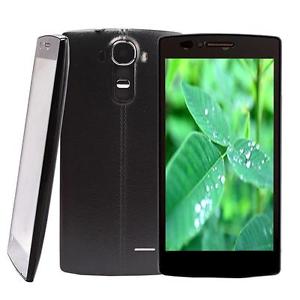
X-BO V15
V15_MT6572_Android4.4
DOWNLOAD
V15_MT6580_Android5.1_V1.0.2
DOWNLOAD
V15_MT6580_Android5.1_V1.0.1
DOWNLOAD
Install ROM:
- Unpack FlashTools, and Click on Flash_tool.exe
- Select "scatter-Loading" and search MT6580_Android_scatter.txt in ROM
- Wait file to be added into Flash Tool
- Select "Download Only" or if upgrade "Firmware upgrade"
- Turn off your phone, remove the battery (if the battery is removable) and replace it after some seconds (and dont turn on the phone).
- Select "scatter-Loading" and search MT6580_Android_scatter.txt in ROM
- Wait file to be added into Flash Tool
- Select "Download Only" or if upgrade "Firmware upgrade"
- Turn off your phone, remove the battery (if the battery is removable) and replace it after some seconds (and dont turn on the phone).
- Press “Download” button to start
- and connect your phone into the computer via USB data cable.
- The process will start and a red progress bar will appear after color purple, yellow.
- And green circles display
- Finish !
- and connect your phone into the computer via USB data cable.
- The process will start and a red progress bar will appear after color purple, yellow.
- And green circles display
- Finish !
- You can now safely disconnect your phone and turn it on.
Available link for download
Sunday, September 4, 2016
DOWNLOAD SONY X BO M3 DISPLAY FIX FIX BLUE SCREEN
DOWNLOAD SONY X BO M3 DISPLAY FIX FIX BLUE SCREEN
Most times after flashing X-BO devices, the display of the device is either white or shows some funny colors. This is as a result of flashing lk.bin or uboot.bin file which does not match the device.
Its always wise to make a backup of the following files boot.img, lk.bin or uboot.bin & logo.bin just in case if things go wrong using a tool like Miracle Box, GSM aladin u can download that from here

DOWNLOAD SONY X-BO M3 DISPLAY FIX ~ FIX BLUE SCREEN Here
Available link for download
DOWNLOAD SONY X BO v8 DISPLAY FIX FIX BLUE SCREEN
DOWNLOAD SONY X BO v8 DISPLAY FIX FIX BLUE SCREEN
Most times after flashing X-BO devices, the display of the device is either white or shows some funny colors. This is as a result of flashing lk.bin or uboot.bin file which does not match the device.
Its always wise to make a backup of the following files boot.img, lk.bin or uboot.bin & logo.bin just in case if things go wrong using a tool like Miracle Box, GSM aladin u can download that from here

DOWNLOAD SONY X-BO v8+ DISPLAY FIX ~ FIX BLUE SCREEN Here
Available link for download
Saturday, September 3, 2016
FIX X BO V3 V3 BLANK AFTER FLASHING FIX BLUE SCREEN
FIX X BO V3 V3 BLANK AFTER FLASHING FIX BLUE SCREEN
Most times after flashing X-BO devices, the display of the device is either white or shows some funny colors. This is as a result of flashing lk.bin or uboot.bin file which does not match the device.
Its always wise to make a backup of the following files boot.img, lk.bin or uboot.bin & logo.bin just in case if things go wrong using a tool like Miracle Box, GSM aladin u can download that from here

DOWNLOAD SONY X-BO V3+ V3 DISPLAY FIX ~ FIX BLUE SCREEN
BELOW ALL VARIANT
variant 1 15mb
variant 2 9mb
variant 3 122kb
vaiant 4 15mb
BELOW ALL VARIANT
variant 1 15mb
variant 2 9mb
variant 3 122kb
vaiant 4 15mb
Available link for download
Wednesday, August 31, 2016
How to restore the Moto X to its factory state
How to restore the Moto X to its factory state
How to restore the Moto X to its factory state - Android users we tested several custom ROMs tend to be exposed to a very serious problem that can leave us with a nice paperweight, and is the bricking your smartphone or tablet. Something that can happen accidentally if any problems occur, such as the end of the battery during the process of installing a ROM (why always recommend start with at least 60 percent of battery charge).
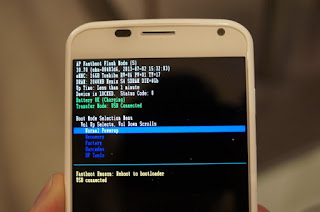
If by some misfortune our Moto X does not start or is in boot loop, then the first thing we have to do is calm down to not start to try anything or worse, several at a time, and evaluate the correct procedures to follow to recover steps. The first thing that can help us and get us out of this trouble is to do a factory reset, a process that gives us our device to its factory state.
The first step towards this is to enter the recovery mode of the Moto X, which perform as follows:
- We turn off the Moto X.
- After a few seconds, we turn on, pressing the switch, volume- and starting and keeping pressed for about 3 or 4 seconds. Then let go.
- We will see the boot menu of Moto X, where we can move down to the volume-key and then select an option by pressing the volume +. We headed to the option and select recovery.
- We will see a logo of an injured android, and now we press keys and volume-volume + simultaneously for about 5 seconds, then pressed the button.
Now we enter the recovery mode we need to go to the option to wipe data factory reset and select it, and then do the same to wipe cache partition.
Finally, select reboot system now, and at the end we will have restarted our Moto X to its factory state.
Available link for download
Tuesday, August 30, 2016
DOWNLOAD SONY X BO v7 DISPLAY FIX FIX BLANK SCREEN AFTER FLASH
DOWNLOAD SONY X BO v7 DISPLAY FIX FIX BLANK SCREEN AFTER FLASH
Most times after flashing X-BO devices, the display of the device is either white or shows some funny colors. This is as a result of flashing lk.bin or uboot.bin file which does not match the device.
Its always wise to make a backup of the following files boot.img, lk.bin or uboot.bin & logo.bin just in case if things go wrong using a tool like Miracle Box, GSM aladin u can download that from here

DOWNLOAD SONY X-BO v7 DISPLAY FIX ~ FIX BLUE SCREEN Here
Available link for download
Sunday, August 28, 2016
All Apple releases iTunes 12 0 1 designed for OS X 10 10 Yosemite
All Apple releases iTunes 12 0 1 designed for OS X 10 10 Yosemite
Apple releases iTunes 12.0.1 designed for OS X 10.10 YosemiteShortly after releasing the final public version of OS X 10.10 Yosemite, Apple on Thursday pushed out iTunes 12.0.1 with various design and performance enhancements in line with the companys new Mac operating system.

According to Apples release notes, iTunes 12.0.1 is "designed for OS X Yosemite," though users of previous Mac operating systems like OS X 10.9 Mavericks can download and use the software.
Along with the usual performance boosts and bug fixes, the newest iTunes revision brings a redesigned interface with translucent elements borrowed from Yosemite. The result is added depth and a cleaner look compared to past software versions.
In addition, users can now activate Family Sharing, a feature that lets customers share music, e-book and app purchases with up to five family members. Family Sharing was introduced with iOS 8 and is now available through Yosemite.
Other tweaks include dedicated icons for music, movies and TV shows, a seamless browsing experience when switching between your library and the iTunes Store and the addition of a Recently Added category that aggregates all newly added content.
Finally, iTunes 12.0.1 features improved playlist editing with side-by-side content panes and improved Get Info windows.
iTunes 12.0.1 can be downloaded for free from the Mac App Store or via Software Update.
Apple also issued a security update for OS X 10.9 Mavericks users. The package contents were not detailed, but the download should show up alongside the latest iTunes version.
According to Apples release notes, iTunes 12.0.1 is "designed for OS X Yosemite," though users of previous Mac operating systems like OS X 10.9 Mavericks can download and use the software.
Along with the usual performance boosts and bug fixes, the newest iTunes revision brings a redesigned interface with translucent elements borrowed from Yosemite. The result is added depth and a cleaner look compared to past software versions.
In addition, users can now activate Family Sharing, a feature that lets customers share music, e-book and app purchases with up to five family members. Family Sharing was introduced with iOS 8 and is now available through Yosemite.
Other tweaks include dedicated icons for music, movies and TV shows, a seamless browsing experience when switching between your library and the iTunes Store and the addition of a Recently Added category that aggregates all newly added content.
Finally, iTunes 12.0.1 features improved playlist editing with side-by-side content panes and improved Get Info windows.
iTunes 12.0.1 can be downloaded for free from the Mac App Store or via Software Update.
Apple also issued a security update for OS X 10.9 Mavericks users. The package contents were not detailed, but the download should show up alongside the latest iTunes version.
Download
Available link for download
X BO X14 Stock Rom Download
X BO X14 Stock Rom Download

X-BO X14
X14_MT6580_V1.0.3
DOWNLOAD
X14_MT6580_V1.0.2
DOWNLOAD
X14_MT6580_V1.0.1
DOWNLOAD
Install ROM:
- Unpack FlashTools, and Click on Flash_tool.exe
- Select "scatter-Loading" and search MT6580_Android_scatter.txt in ROM
- Wait file to be added into Flash Tool
- Select "Download Only" or if upgrade "Firmware upgrade"
- Turn off your phone, remove the battery (if the battery is removable) and replace it after some seconds (and dont turn on the phone).
- Select "scatter-Loading" and search MT6580_Android_scatter.txt in ROM
- Wait file to be added into Flash Tool
- Select "Download Only" or if upgrade "Firmware upgrade"
- Turn off your phone, remove the battery (if the battery is removable) and replace it after some seconds (and dont turn on the phone).
- Press “Download” button to start
- and connect your phone into the computer via USB data cable.
- The process will start and a red progress bar will appear after color purple, yellow.
- And green circles display
- Finish !
- and connect your phone into the computer via USB data cable.
- The process will start and a red progress bar will appear after color purple, yellow.
- And green circles display
- Finish !
- You can now safely disconnect your phone and turn it on.
Available link for download
Friday, August 26, 2016
Download X BO Q11 Firmware Pac File
Download X BO Q11 Firmware Pac File

Download X-BO Q11 Pac file
SPD 6820
DOWNLOAD
Learn How to flash x-bo q11 here
Install ROM:
FactoryDownload/UpgradeDownload
1 Unpack ROM and extract s80v13_dx_m9_en_msg2xxx_g2_256M_v02.pac
2 Run UpgradeDownload or FactoryDownload, connect your android device to the computer
3 Click on "Load packet" and add the .pac
4 Click on "Start"
5 During the flashing your mobile will restart automatically
6 Finish
2 Run UpgradeDownload or FactoryDownload, connect your android device to the computer
3 Click on "Load packet" and add the .pac
4 Click on "Start"
5 During the flashing your mobile will restart automatically
6 Finish
Available link for download
Subscribe to:
Posts (Atom)