Showing posts with label from. Show all posts
Showing posts with label from. Show all posts
Thursday, September 1, 2016
How To Remove FRP Lock From Huawei Honor 5X KIW L21 1000Test
How To Remove FRP Lock From Huawei Honor 5X KIW L21 1000Test
Any Problam Call Me:+8801966128447
md.iqbalkhan708@yhaoo.com
Available link for download

Tuesday, August 30, 2016
Access Google Talk Facebook Chat From One Single Android App
Access Google Talk Facebook Chat From One Single Android App
To be connected with friends all the time is a desire that everyone has. With a smart phone like Android we have many options to do so. There are many Free apps available to do this, like Nimbuss, Im+, ebuddy etc. All these apps provides advance features like, group sharing, multiple Social Network chat, group chat, VOIP services and many more.
If you are using a high end android device then you might enjoy the above mentioned services without further thoughts. But the problem that I faced with a mid range device like Galaxy Ace or Galaxy Y is that these apps run a bit slow. Probably while switching to other chat window when several chats are in progress. Another thing about big services is that you will be needing to create an account with them first. The fact about having multiple chats is that though you are provided with several services, you will be using only few of them. Facebook and Gtalk stands at top of the list.
So why not go along with an app that provides you just the features that you need. Talk.to is a simple free app that allows you to do exactly the same.
Features of Talk.to
- App is simple and fast.
- Add multiple Gtalk and Facebook accounts.
- Chat delivery report.
- Chat sync over multiple devices.
- Mark contacts as favorite.
- Leave offline messages.
When you fire up the app for the first time, you will be presented with the login page. Login to any service you want, the chat list appears instantly. To add more accounts later, tap on @ and add the account. The best thing is that you can add multiple Gtalk and Facebook accounts. This is particularly useful when you have separate personal and business Gmail accounts.
There are three tabs, Chats, favorites and online. In online friends section, you can see all friends online from Facebook and Gtalk in alphabetical order. To avoid confusion there is a small source logo beside every contact. you can also make a quick search to find friends from list
Developers have also listed future updates to be added which include; Free SMS credits, Smiley packs, Group chat across all networks, Support for Windows Live Messenger and adding many more services.
Available link for download
Monday, August 29, 2016
How to Backup – Restore Call Log and SMS from Android to Gmail
How to Backup – Restore Call Log and SMS from Android to Gmail
Backing up Phone data time to time is a good practice. With Android, it is possible to keep your Contacts synced with Gmail all the time. Apart from contacts, Android also syncs your app list. So, this feature helps you to get back the apps and contacts when you flash or factory reset your phone. Sadly, there is no in-built feature in Android to Sync your SMS, MMS or call log to and from Gmail.
So how do you benefit by syncing SMS and call log to Gmail? This might be a question in your mind if you are already using SMS apps like Go SMS, Handsent SMS etc. To backup SMS. Well, by sync feature you can get all your SMS and Call Logs directly on the fresh device. There is no need to worry about downloading additional SMS apps and searching for the back up file on your SD card.
You Can Use Titanium Backup
It will be much more convenient to have things backed up with Google. So lets see how to achieve this feature on your Android Phone.
How to Backup/ Restore Call Log, SMS and MMS to Gmail
What you will need:
To start with this tutorial, first you will need an Internet connection, an Android Phone running on Gingerbread and above. Last thing will be a small free app- Backup message & call to Email from Google Play.
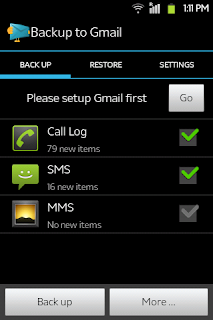
Configuring Backup message & call to Email
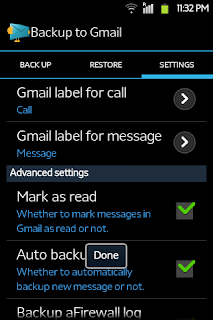
As I have mentioned earlier, it is very easy to configure. In the mandatory section, you will just need to login with your Gmail ID. Then you can select the services to backup. Best practice will be to keep the auto sync feature on. It might increase your data usage a bit but you can forget about manual backups.
Available link for download
Sunday, August 21, 2016
TeXTe For Android Lets You Filter Through Messages From Important Contacts
TeXTe For Android Lets You Filter Through Messages From Important Contacts
TeXTe for Android is a novel little app which allows you to set a specific code word, which in turn can be shared with important contacts and when your device is on silent, TeXTe will detect the word within the message, and a loud alarm will ring loud and clear, ensuring you don’t miss anything you may need to know.
Deciding when to turn a device on silent is not always as straightforward as it should be. When you’re trying to get some sleep, or getting stuck into a bit of important research, the inclination to demand pure silence is naturally rather high. Yet there may be one or two contacts you always wish to hear from no matter what, and in those instances, TeXTe could come in very handy.

Sure, there are apps out there which let you whitelist certain individuals at certain times, silencing them on other occasions as set by the schedule. But the code word idea is arguably more advanced, because it’s not just tied to the contact, but the actual person. So if, say, your best friend is stuck on the highway and borrows someone else’s phone to drop you a line, they can use the code word, and that message will be heard among seas of silence.
It’s an incredibly simple, yet slightly ingenious idea, and since it works with your popular third-party SMS clients you should have absolutely no trouble getting started with it.

What’s better than a very clever app that does everything it purports to do with aplomb? Well, it’s also completely free of charge, so if you would like to give TeXTe a try out for yourself, grab it via the link provided below.
Obviously, your code word should only be shared with those you can trust, for if the word does manage to leak, you could end up getting woken up or interrupted on a frequent basis, allied to the fact that you’ll have to change the code word once more.
Still, it’s quirky, it’s neat, and we really like it here at Android&Technology so download it, and be sure to leave your comments via the usual mediums.
(Source: TeXTe for Android on the Play Store)
Available link for download
Subscribe to:
Posts (Atom)