Showing posts with label messages. Show all posts
Showing posts with label messages. Show all posts
Tuesday, September 6, 2016
How to stop cell broadcast ETWS messages and notifications in android mobiles
How to stop cell broadcast ETWS messages and notifications in android mobiles
Hi guys..recently I have faced a problem in my friend mobile lenova a7000. In which the network provider gives lot of ETWS cell broadcast messages. It annoys lot.
First ETWS stands for is Earthquake Tsunamis Warning Messges which provided by Network provider.
You can disable these notification via following steps
1. Open Message app in your mobile
2. Open Message settings
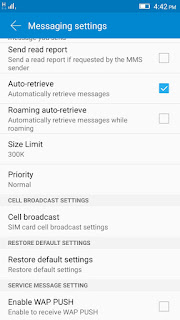
3. Just locate the cell broadcast option in the message settings.
4. Click on cell broadcast which is shows which provider gives the ETWS messages. Just click on that.
 5. Now just untick the ETWS alerts.
Thats it..
Now you would not receive any type of broadcast messages.
Note: The steps may be varied in other mobile. But its almost locate in message settings only.
First ETWS stands for is Earthquake Tsunamis Warning Messges which provided by Network provider.
You can disable these notification via following steps
1. Open Message app in your mobile
2. Open Message settings
3. Just locate the cell broadcast option in the message settings.
4. Click on cell broadcast which is shows which provider gives the ETWS messages. Just click on that.
Thats it..
Now you would not receive any type of broadcast messages.
Note: The steps may be varied in other mobile. But its almost locate in message settings only.
Available link for download

Sunday, August 21, 2016
TeXTe For Android Lets You Filter Through Messages From Important Contacts
TeXTe For Android Lets You Filter Through Messages From Important Contacts
TeXTe for Android is a novel little app which allows you to set a specific code word, which in turn can be shared with important contacts and when your device is on silent, TeXTe will detect the word within the message, and a loud alarm will ring loud and clear, ensuring you don’t miss anything you may need to know.
Deciding when to turn a device on silent is not always as straightforward as it should be. When you’re trying to get some sleep, or getting stuck into a bit of important research, the inclination to demand pure silence is naturally rather high. Yet there may be one or two contacts you always wish to hear from no matter what, and in those instances, TeXTe could come in very handy.

Sure, there are apps out there which let you whitelist certain individuals at certain times, silencing them on other occasions as set by the schedule. But the code word idea is arguably more advanced, because it’s not just tied to the contact, but the actual person. So if, say, your best friend is stuck on the highway and borrows someone else’s phone to drop you a line, they can use the code word, and that message will be heard among seas of silence.
It’s an incredibly simple, yet slightly ingenious idea, and since it works with your popular third-party SMS clients you should have absolutely no trouble getting started with it.

What’s better than a very clever app that does everything it purports to do with aplomb? Well, it’s also completely free of charge, so if you would like to give TeXTe a try out for yourself, grab it via the link provided below.
Obviously, your code word should only be shared with those you can trust, for if the word does manage to leak, you could end up getting woken up or interrupted on a frequent basis, allied to the fact that you’ll have to change the code word once more.
Still, it’s quirky, it’s neat, and we really like it here at Android&Technology so download it, and be sure to leave your comments via the usual mediums.
(Source: TeXTe for Android on the Play Store)
Available link for download
Subscribe to:
Posts (Atom)