Showing posts with label mobiles. Show all posts
Showing posts with label mobiles. Show all posts
Tuesday, September 6, 2016
How to stop cell broadcast ETWS messages and notifications in android mobiles
How to stop cell broadcast ETWS messages and notifications in android mobiles
Hi guys..recently I have faced a problem in my friend mobile lenova a7000. In which the network provider gives lot of ETWS cell broadcast messages. It annoys lot.
First ETWS stands for is Earthquake Tsunamis Warning Messges which provided by Network provider.
You can disable these notification via following steps
1. Open Message app in your mobile
2. Open Message settings
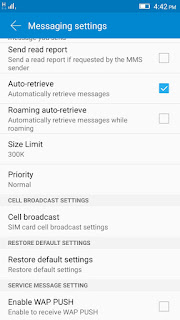
3. Just locate the cell broadcast option in the message settings.
4. Click on cell broadcast which is shows which provider gives the ETWS messages. Just click on that.
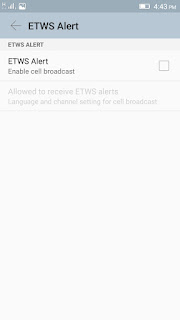 5. Now just untick the ETWS alerts.
Thats it..
Now you would not receive any type of broadcast messages.
Note: The steps may be varied in other mobile. But its almost locate in message settings only.
First ETWS stands for is Earthquake Tsunamis Warning Messges which provided by Network provider.
You can disable these notification via following steps
1. Open Message app in your mobile
2. Open Message settings
3. Just locate the cell broadcast option in the message settings.
4. Click on cell broadcast which is shows which provider gives the ETWS messages. Just click on that.
Thats it..
Now you would not receive any type of broadcast messages.
Note: The steps may be varied in other mobile. But its almost locate in message settings only.
Available link for download

Tuesday, August 30, 2016
How to convert single VCF file into multiple VCF for Nokia s40 s60 and Java Mobiles contacts
How to convert single VCF file into multiple VCF for Nokia s40 s60 and Java Mobiles contacts
Now a day billions of user using android mobiles because of the excellent user friendly interface for touch screen mobiles. If you backed up your android mobile contact that will stored single .vcf file. You could not able to view this or use this contact into normal nokia S40 and S60 symbian mobiles like Nokia 3110, N73,92 models
Requirnments:
Nokia pc suite or Ovi suite
NbuExplore click here
Steps :
1.First backup your contact into .vcf format. For this just export your contacts into memory card and copy that file into your computer. Or export your google contacts into .vcf format on online.
2.Next open NbuExplorer. (Note you must installed JRE to run the Nbuexplorer. Otherwise it cant work )
3.In NbuExplorer open your .vcf file using File?Open option
4.After opening your contact just right click on that and choose Export all option. All contacts will stored in a selected folder.
5.Now open Nokia pc suite and connect your mobile through data cable.
6.Go to contacts option import all created .vcf file.
7.The contact will sync into your mobile..
Enjoy?
Available link for download
Subscribe to:
Posts (Atom)