Showing posts with label p. Show all posts
Showing posts with label p. Show all posts
Sunday, August 28, 2016
How to Install ClockworkMod Recovery CWM on Sony Xperia P ICS and JB
How to Install ClockworkMod Recovery CWM on Sony Xperia P ICS and JB
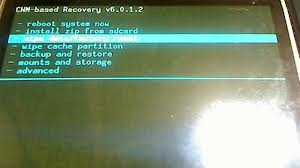
What is CWM? For taking Nandroid Backups, flashing zip files, if you caught in bootloops due to something wrong flashed WITHOUT backup of your important data, you can go for backup in TAR format from CWM Recovery and later on, extract the tar data and put in Titanium Backup to get it back... (YOU CANT USE WHOLE BACKUP THAT HAVE BEEN TAKEN AFTER BOOTLOOPS)
Thanks to atis112 for the Recovery.
Disclaimer : I am not responsible if you brick your phone or if u make any other damage to your phone
Note : This works on both locked and unlocked bootloader devices!!!
REQUIREMENTS :-
1. Stock ICS / JellyBean ROM
2. Root (Instructions to Root Jelly Bean Click Here)
INSTRUCTIONS :-
1. Download this zip package - CWM Recovery 6.0.1.2
2. Extract the zip file.
3. Enable USB debugging from Settings > Developer Options.
4. Enable Unknown sources from Settings > Security
5. Connect your phone to your Computer.
6. Click on install.bat and follow the onscreen instructions.
HOW TO USE :-
1. Power Off your Phone.
2. Power On your Phone.
3. Press the Volume Down Button when you see the Sony Logo ( Tap the Volume Down 2-3 Times )
Source - LINK
Available link for download

Friday, August 26, 2016
How to Install JellyBean 6 2 A 1 100 on Sony Xperia P
How to Install JellyBean 6 2 A 1 100 on Sony Xperia P

Disclaimer : I am not responsible if you brick your phone or if u make any other damage to your phone
Step 1 : First of all download this ftf File from here - DOWNLOAD LINK
Step 2 :
- Download Flashtool from the official website - http://androxyde.github.io/
- Install it on your PC using onscreen instructions.It will create a folder "Flashtool" in your drive(CFlastool)
- Now go to CFlastooldriversflastool-drivers.exe and click on it and install it after marking/checking "xperia p,xperia u,xperia sola drivers" which is below there on the list
- Restart your PC
Note: Make sure you have USB debugging on. If not goto setting>developer options> and check USB debugging on
Step 3 : Now place the downloaded ftf file to C:/Flashtool/firmwares/

Step 4 : Now open Flashtool from the Start Menu
Step 5 : Now click on the FLASH icon of the flashtool which is on the left side of the iconic tab(below the file option-its like a lightning sign).a window will be opened Mode Selector. Check "FlashMode" and press "ok" button.

Step 6 : Now Select the Firware file which you had placed in C:/Flashtool/firmwares/ in Step 3
Step 7 : A Dialogue Box will appear just click on OK

Step 8 : Now the flashtool will prepare files for flashing and then you will be prompted to connect phone in flashmode.

Step 9 :
- Now Power Off your phone and wait for 5 Seconds, then Connect your phone to PC using USB cable while pressing volume down button (-) (Make sure you dont release Volume down button until flashtool starts flashing)
- Flashtool will start flashing firmware it may take some time.
- After flashing flashtool will prompt you to disconnect you phone. Discconet it and power on your phone (It may take some time for the first boot).
- Enjoy the Official Jelly Bean
Thanks dewanshu93
Feel Free to Comment if you have any doubts ;)
Feel Free to Comment if you have any doubts ;)
Available link for download
Wednesday, August 17, 2016
How to Root Sony Xperia P Xperia Go on 4 1 2 Jelly Bean Build 6 2 A 1 100
How to Root Sony Xperia P Xperia Go on 4 1 2 Jelly Bean Build 6 2 A 1 100

So Finally an easy rooting method is available for Xperia P and Go Jelly Bean [Build 6.2.A.1.100]. Thanks to DooMLoRD for the root method.
Disclaimer : I am not responsible if you brick your phone or if u make any other damage to your phone
Disclaimer : I am not responsible if you brick your phone or if u make any other damage to your phone
So Lets Start :
1. First of all make sure, your Build number is 6.2.A.1.100. Go to Settings > About phone to verify this
2. Download This File - DooMLoRD_Easy-Rooting-Toolkit_v17_perf-event-exploit and extract it completely using WinRAR or WinZip.
3. Enable USB debugging from Settings > Developer Options.
4. Enable Unknown sources from Settings > Security
5. [Optional] Increase screen timeout to 10 minutes
6. Connect USB Cable to phone , then connect it to your Computer. On your phone Skip the PC Companion Companion prompt (if it appears), see screenshot below.

7. Now go to the Folder where you extracted the downloaded file from Step 2, and execute "runme_win.bat" (Windows User)
Note :- This toolkit works on Windows , Linux as well as MAC , Linux users Run "runme_linux.sh" and MAC users Run "runme_mac.sh".

8. Read and Follow the instructions on the screen!
9. REBOOT THE DEVICE AFTER THE SCRIPT HAS FINISHED EXECUTION!!!
Note : This method works on both locked and unlocked bootloader devices!!!
If you have any problems feel free to comment :)
Source - XDA
Available link for download
Thursday, August 11, 2016
Sony Xperia P LT22i Jelly Bean 4 1 2 Tested Firmware
Sony Xperia P LT22i Jelly Bean 4 1 2 Tested Firmware
You can use the firmware for flash or reset screen lock 100% tested.
Mobile : Xperia P
Model : LT22i
System Version : Jelly Bean 4.1.2
Baseband : 6.2.A.1.100 Customized MEA

Mobile : Xperia P
Model : LT22i
System Version : Jelly Bean 4.1.2
Baseband : 6.2.A.1.100 Customized MEA
download link:
LT22i_6.2.A.1.100_Customized MEA--www.SamSony.net--.zip - 640.56 MB
flash tool:
https://mega.nz/#!z4sSTaQZ!BVO7GSmoTrTwuuJAhadVCO6LQqLXMF543teobwpDG-I
download mode (power off device volume down+plug usb)
how to flash:
Available link for download
Subscribe to:
Posts (Atom)