Showing posts with label clockworkmod. Show all posts
Showing posts with label clockworkmod. Show all posts
Sunday, August 28, 2016
How to Install ClockworkMod Recovery CWM on Sony Xperia P ICS and JB
How to Install ClockworkMod Recovery CWM on Sony Xperia P ICS and JB
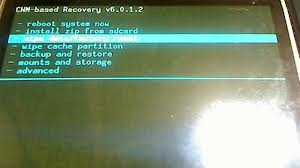
What is CWM? For taking Nandroid Backups, flashing zip files, if you caught in bootloops due to something wrong flashed WITHOUT backup of your important data, you can go for backup in TAR format from CWM Recovery and later on, extract the tar data and put in Titanium Backup to get it back... (YOU CANT USE WHOLE BACKUP THAT HAVE BEEN TAKEN AFTER BOOTLOOPS)
Thanks to atis112 for the Recovery.
Disclaimer : I am not responsible if you brick your phone or if u make any other damage to your phone
Note : This works on both locked and unlocked bootloader devices!!!
REQUIREMENTS :-
1. Stock ICS / JellyBean ROM
2. Root (Instructions to Root Jelly Bean Click Here)
INSTRUCTIONS :-
1. Download this zip package - CWM Recovery 6.0.1.2
2. Extract the zip file.
3. Enable USB debugging from Settings > Developer Options.
4. Enable Unknown sources from Settings > Security
5. Connect your phone to your Computer.
6. Click on install.bat and follow the onscreen instructions.
HOW TO USE :-
1. Power Off your Phone.
2. Power On your Phone.
3. Press the Volume Down Button when you see the Sony Logo ( Tap the Volume Down 2-3 Times )
Source - LINK
Available link for download

Thursday, August 18, 2016
How to Install ClockworkMod Recovery CWM on Sony Xperia Go ICS and JB
How to Install ClockworkMod Recovery CWM on Sony Xperia Go ICS and JB

What is CWM? For taking Nandroid Backups, flashing zip files, if you are caught in bootloops due to something wrong flashed WITHOUT backup of your important data, you can go for backup in TAR format from CWM Recovery and later on, extract the tar data and put in Titanium Backup to get it back... (YOU CANT USE WHOLE BACKUP THAT HAVE BEEN TAKEN AFTER BOOTLOOPS) and for many more things :P you can search on google to know more about CWM ;)
Thanks to atis112 for the Recovery.
This recovery is only for Xperia Go (ST27i/ST27) do not try it on any other phone. This works on Ice Cream Sandwich 4.0.4 as well as on Jelly Bean 4.1.2.
Disclaimer : I am not responsible if you brick your phone or if u make any other damage to your phone
Note : This works on both locked and unlocked bootloader devices!!!
REQUIREMENTS :-
1. Stock ICS / JellyBean ROM
2. Root (Instructions to Root Jelly Bean Click Here)
INSTRUCTIONS :-
1. Download this zip package - CWM Recovery 6.0.1.2
2. Extract the zip file.
3. Enable USB debugging from Settings > Developer Options.
4. Enable Unknown sources from Settings > Security
5. Connect your phone to your Computer.
6. Click on install.bat and follow the onscreen instructions.
HOW TO USE :-
1. Power Off your Phone.
2. Power On your Phone.
3. Press the Volume Down Button when you see the Sony Logo ( Tap the Volume Down 2-3 Times )
Source - LINK
Available link for download
Subscribe to:
Posts (Atom)