Sunday, August 14, 2016
How to Install Android Lollipop 5 0 2 Build 14 5 A 0 242 on Sony Xperia Z1 C6902 C6903 C6909 C6943
How to Install Android Lollipop 5 0 2 Build 14 5 A 0 242 on Sony Xperia Z1 C6902 C6903 C6909 C6943
Sony has finally released the official update of Android 5.0.2 ( Build 14.5.A.0.242 ) on Sony Xperia Z1 , but it is yet to roll out in all the countries and devices. So if you are yet to receive the update and cannot wait , here is the method to update your Xperia Z1 to Android 5.0.2 Official
This tutorial is about installing Android 5.0.2 14.5.A.0.242 on Sony Xperia Z1
This tutorial is only for Sony Xperia Z1 ( C6902, C6903, C6909, C6943 ) . Do no flash this on any other phone like Z1 compact , etc.

Disclaimer : I am not responsible if you brick your phone or if u make any other damage to your phone
Step 1 : First of all download this ftf File from here - DOWNLOAD LINK OR You can create your own FTF - Tutorial Link
Step 2 :
- Download Flashtool from the official website - http://www.flashtool.net/downloads.php
- Install it on your PC using onscreen instructions. It will create a folder "Flashtool" in your drive (C:Flashtool)
- Now go to CFlastooldriversflastool-drivers.exe and click on it and install it after marking/checking "Flashmode drivers and Xperia Z1 Driver"
- Restart your PC

Note: Make sure you have USB debugging on. If not goto setting>developer options> and check USB debugging on
Step 3 : Now place the downloaded ftf ( from Step 1 ) file to C:/Flashtool/firmwares/
Step 4 : Now open Flashtool from the Start Menu
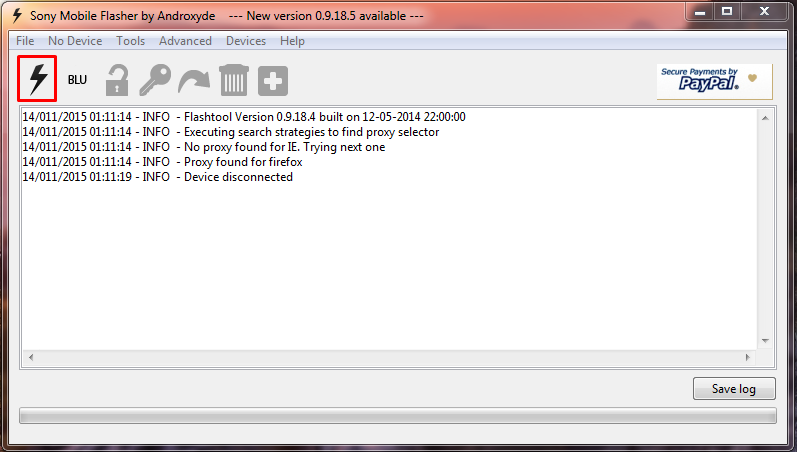
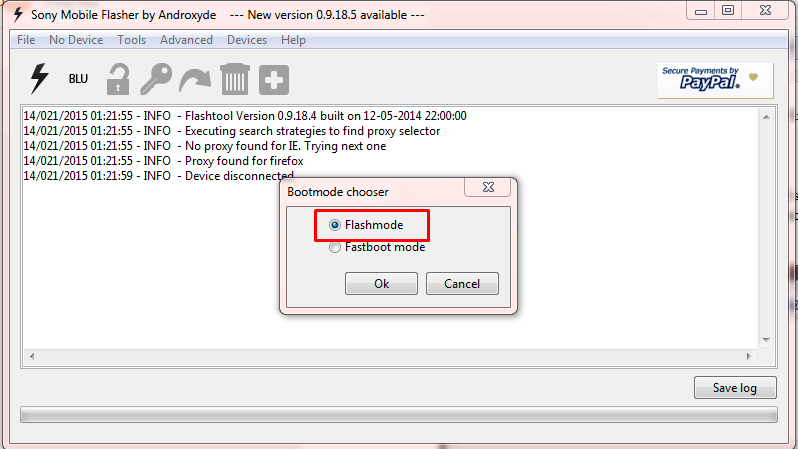
Step 5 : Now click on the FLASH icon of the flashtool which is on the left side of the iconic tab(below the file option-its like a lightning sign).a window will be opened Mode Selector. Check "FlashMode" and press "ok" button.
Step 6 : Now Select the Firmware file which you had placed in C:/Flashtool/firmwares/ in Step 3

Step 7 : Now Click on the Flash Button
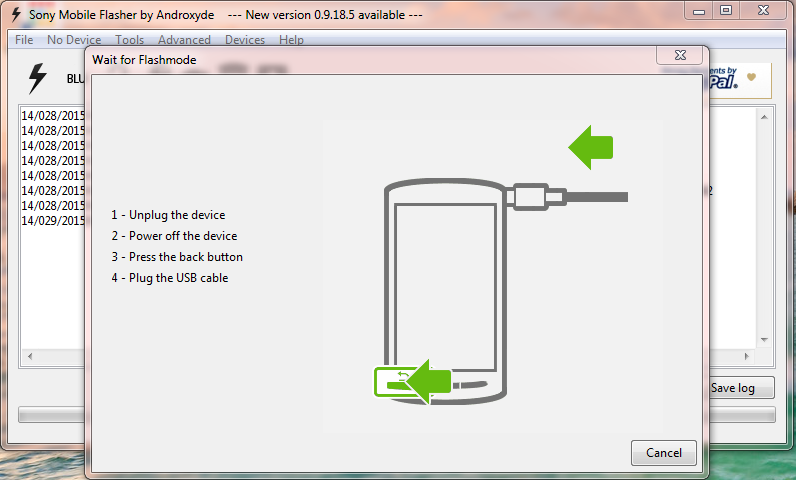
Step 8 : Now the flashtool will prepare files for flashing and then you will be prompted to connect phone in flashmode.
Step 9 :
- Now Power Off your phone and wait for 5 Seconds, then Connect your phone to PC using USB cable while pressing volume down button (-) (Make sure you dont release Volume down button until flashtool starts flashing)
- Flashtool will start flashing firmware it may take some time. ( Now u can release the volume down button )
- After flashing flashtool will prompt you to disconnect you phone. Discconet it and power on your phone (It may take some time for the first boot).
- Enjoy the Official Lollipop Android 5.0.2 on your Xperia Z1
Feel Free to Comment if you have any doubts ;)
Available link for download
