Showing posts with label jelly. Show all posts
Showing posts with label jelly. Show all posts
Saturday, September 10, 2016
Sony Xperia M C1905 Jelly Bean 4 3 Tested Firmware
Sony Xperia M C1905 Jelly Bean 4 3 Tested Firmware
You can use the firmware for flash or reset screen lock 100% tested.
Mobile : Xperia M
Model : C1905
System Version : Jelly Bean 4.3
Baseband : 15.4.A.1.9 Customized MEA

Mobile : Xperia M
Model : C1905
System Version : Jelly Bean 4.3
Baseband : 15.4.A.1.9 Customized MEA
download link:
C1905_15.4.A.1.9_Customized_MEA--www.SamSony.net--.rar - 707.34 MB
flash tool:
https://mega.nz/#!z4sSTaQZ!BVO7GSmoTrTwuuJAhadVCO6LQqLXMF543teobwpDG-I
download mode (power off device volume down+plug usb)
Available link for download

Friday, September 9, 2016
Sony Xperia acro S LT26w Jelly Bean 4 1 2 tested firmware
Sony Xperia acro S LT26w Jelly Bean 4 1 2 tested firmware
You can use the firmware for flash or reset screen lock 100% tested.

Mobile : Xperia acro S
Model : LT26w
System Version : Jelly Bean 4.1.2
Baseband : 6.2.B.1.96 Customized MEA
Model : LT26w
System Version : Jelly Bean 4.1.2
Baseband : 6.2.B.1.96 Customized MEA
download link:
LT26w_6.2.B.1.96_Customized_MEA--www.SamSony.net--.rar - 509.30 MB
flash tool:
https://mega.nz/#!z4sSTaQZ!BVO7GSmoTrTwuuJAhadVCO6LQqLXMF543teobwpDG-I
fellow instruction in video bellow (just to show you the method):
Available link for download
Tuesday, September 6, 2016
Sony Xperia E C1505 Jelly Bean 4 1 1 Tested Firmware
Sony Xperia E C1505 Jelly Bean 4 1 1 Tested Firmware
You can use the firmware for flash or reset screen lock 100% tested.
Mobile : Xperia E
Model : C1505
System Version : Jelly Bean 4.1.1
Baseband : 11.3.A.2.33 Customized MEA

Mobile : Xperia E
Model : C1505
System Version : Jelly Bean 4.1.1
Baseband : 11.3.A.2.33 Customized MEA
download link;
C1505_11.3.A.2.33_Customized_MEA--www.SamSony.net--.rar - 391.15 MB
flash tool:
https://mega.nz/#!z4sSTaQZ!BVO7GSmoTrTwuuJAhadVCO6LQqLXMF543teobwpDG-I
download mode (power off device volume down+plug usb)
Available link for download
How to Root Sony Xperia Z1 C6902 C6903 C6906 C6943 4 2 2 Jelly Bean Build 14 1 G 1 534
How to Root Sony Xperia Z1 C6902 C6903 C6906 C6943 4 2 2 Jelly Bean Build 14 1 G 1 534
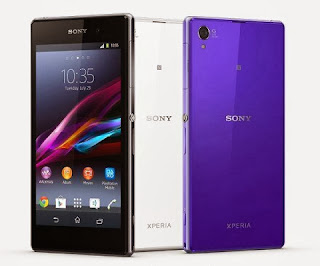
Root Your Sony Xperia Z1 Running Jelly Bean 4.2.2 Build number 14.1.G.1.534. This works on Locked Bootloader as well as Unlocked Bootloader. All the images used in the tutorial are not mine , I have used images by krabappel2548 , special thanks to him and the Chinese who have made the software vRoot , which we will using to root the phone.
This tutorial is for Xperia Z1 running Jelly Bean 4.2 Build number 14.1.G.1.534.
Disclaimer : I am not responsible if you brick your phone or if u make any other damage to your phone, you have been warned.
So Lets Start :
1. First make sure you are running Jelly Bean 4.2.2 Build 14.1.G.1.534. Go to Settings > About to verify this.
2. Enable USB Debugging , Go to Settings > About phone and tap 7 times on Build number to enable Developer options, now Go to Settings > Developer options to enable Enable USB debugging mode.
3. Enable Unknown Sources. Go to Settings > Security and check Unknown sources.
4. Download vRoot from here - http://www.mgyun.com/vroot
Yeah it is in Chinese, so bear with it :P , download it and install this software just click next next like u install any other software :P
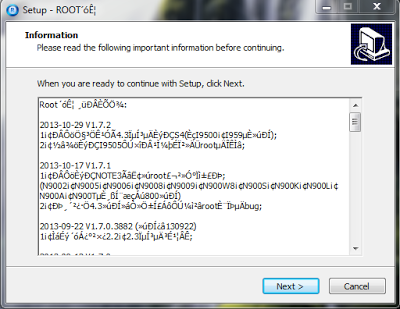
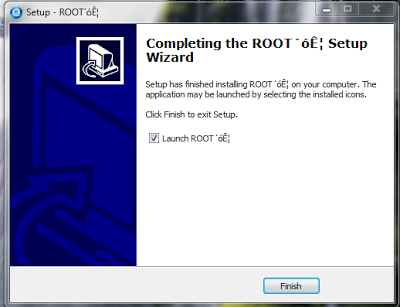
5. Open the vRoot (ROOT´óʦ , this will be the name of the program) and Connect your data cable to your phone and PC , you will see a green Root icon in vRoot, click on that to start the rooting process. See the below screenshot.
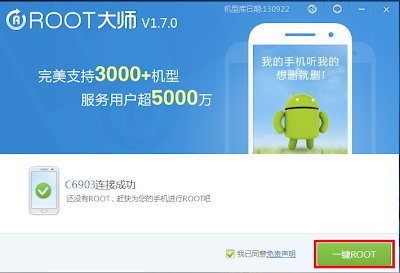
6. When it is finished your phone will restart automatically and vRoot will show something like the below screenshot.
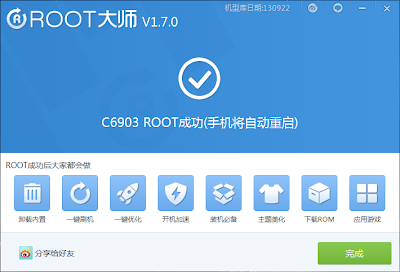
7. Congratulations your phone is now rooted . To verify see the Kinguser app , see the note below to replace it with SuperSU.
Note :- If you want to change the Kinguser (Chinese Superuser app) to SuperSU , Download this File - LINK. Extract it somewhere , and run runme_win.bat. Kinguser will change to SuperSU.
OR
If you want to change the Kinguser (Chinese Superuser app) to SuperSU , just download SuperSU from Playstore , open it , it will ask for Root Permissions , grant it , then follow the screen instructions to update the binary. Now open SuperSU , go to Settings and click on "Install SuperSU into /system" . Your phone will reboot and Kinguser will automatically get uninstalled :)
Note : This method works on both locked and unlocked bootloader devices!!!
If you have any problems feel free to comment.
Source - XDA
Available link for download
Saturday, September 3, 2016
How to Root Sony Xperia L C2104 C2105 Jelly Bean 4 2 2 Build 15 3 A 0 26
How to Root Sony Xperia L C2104 C2105 Jelly Bean 4 2 2 Build 15 3 A 0 26

Today Xperia L got the Jelly Bean 4.2.2 Update unexpectedly , and here is how to root Xperia L running the new Jelly Bean 4.2.2 Build Number 15.3.A.0.26. This works for both locked bootloader as well as unlocked bootloader devices.
This tutorial is for Xperia L Running Jelly Bean 4.2.2 with Build Number 15.3.A.0.26 .
Disclaimer : I am not responsible if you brick your phone or if u make any other damage to your phone
So Lets Start :
1. First make sure you are running Jelly Bean 4.2.2 Build 15.3.A.0.26. Go to Settings > About to verify this.

2. Enable USB Debugging , Go to Settings > About phone and tap 7 times on Build number to enable Developer options, now Go to Settings > Developer options to enable Enable USB debugging mode.
3. Enable Unknown Sources. Go to Settings > Security and check Unknown sources.
4. Download vRoot from here - http://www.mgyun.com/vroot
Yeah it is in Chinese, so bear with it :P , download it and install this software just click next next like u install any other software :P


5. Open the vRoot and Connect your phone Xperia L to your PC , you will see a green Root icon in vRoot, click on that to start the rooting process. See the below screenshot.

6. When it is finished your phone will restart automatically and vRoot will show something like the below screenshot.

7. Congratulations your phone is now rooted :P. To verify see the Kinguser app , see the note below to replace it with SuperSU.

Note :- If you want to change the Kinguser (Chinese Superuser app) to SuperSU , Download this File - LINK. Extract it somewhere , and run runme_win.bat. Kinguser will change to SuperSU.
OR
If you want to change the Kinguser (Chinese Superuser app) to SuperSU , just download SuperSU from Playstore , open it , it will ask for Root Permissions , grant it , then follow the screen instructions to update the binary. Now open SuperSU , go to Settings and click on "Install SuperSU into /system" . Your phone will reboot and Kinguser will automatically get uninstalled :)

Note : This method works on both locked and unlocked bootloader devices!!!
If you have any problems feel free to comment.
Available link for download
Friday, September 2, 2016
Sony Xperia M C1904 Jelly Bean 4 3 Tested Firmware
Sony Xperia M C1904 Jelly Bean 4 3 Tested Firmware
You can use the firmware for flash or reset screen lock 100% tested.
Mobile : Xperia M
Model : C1904
System Version : Jelly Bean 4.3
Baseband : 15.4.A.1.9 WORLD
Mobile : Xperia M
Model : C1904
System Version : Jelly Bean 4.3
Baseband : 15.4.A.1.9 WORLD
download link:
C1904_15.4.A.1.9_WORLD--www.SamSony.net--.ftf - 737.33 MB
flash tool:
https://mega.nz/#!z4sSTaQZ!BVO7GSmoTrTwuuJAhadVCO6LQqLXMF543teobwpDG-I
download mode (power off device volume down+plug usb)
Available link for download
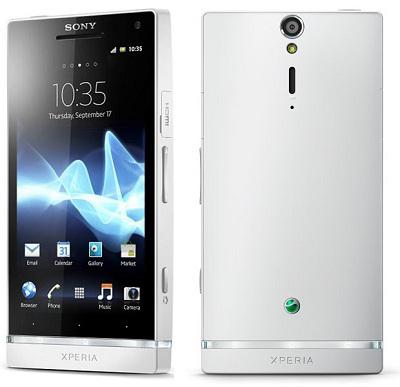
Sony Xperia S LT26i Jelly Bean 4 1 2 Tested Firmware
Sony Xperia S LT26i Jelly Bean 4 1 2 Tested Firmware
You can use the firmware for flash or reset screen lock 100% tested.
Mobile: Xperia S
Model: LT26i
System Version: Jelly Bean 4.1.2
Baseband: 6.2.B.0.211
Mobile: Xperia S
Model: LT26i
System Version: Jelly Bean 4.1.2
Baseband: 6.2.B.0.211
download link:
LT26i_6.2.B.0.211.1257-8080_LBI--www.samsony.net--.ftf - 508.16 MB
flash tool:
https://mega.nz/#!z4sSTaQZ!BVO7GSmoTrTwuuJAhadVCO6LQqLXMF543teobwpDG-I
how to flash:
how to flash:
Available link for download
Thursday, September 1, 2016
How to Root Sony Xperia SP C5302 C5303 Jelly Bean 4 1 2 Build 12 0 A 2 254
How to Root Sony Xperia SP C5302 C5303 Jelly Bean 4 1 2 Build 12 0 A 2 254

Root your Sony Xperia SP (C5302 / C5303) on the latest Jelly Bean 4.1.2 Firmware 12.0.A.2.254. This is for only for 12.0.A.2.254 firmware , do not try this method on any other firmware or variant.
If you want to root an older firmware READ THIS , or if you want to root 12.0.2.245 , READ THIS
Disclaimer : I am not responsible if you brick your phone or if u make any other damage to your phone
So Lets Start :
1. First of all download these three files :
- XperiaSP_C530X_12.0.A.1.257_KernelOnly.ftf
- DooMLoRD_Easy-Rooting-Toolkit_v18_perf-event-exploit.zip
- XperiaSP_C530X_12.0.A.2.254_KernelOnly.ftf
2. Run Flashtool and Flash XperiaSP_C530X_12.0.A.1.257_KernelOnly.ftf file. (Follow the onscreen instructions of Flashtool) If you have not used Flashtool before Refer this - LINK.
3. Now when the flashing is finished , reboot your Device and Connect Your Device to PC with USB Debugging Mode On , go to Settings > Developer Options to enable it.
4. CLOSE FLASHTOOL ( Do Not Skip This Step )
5. Extract the file DooMLoRD_Easy-Rooting-Toolkit_v18_perf-event-exploit.zip to root directory on C:
6. Now go to the Folder where you extracted DooMLoRD_Easy-Rooting-Toolkit_v18_perf-event-exploit.zip, and execute "runme_win.bat" (Windows Users).
Note :- This toolkit works on Windows , Linux as well as MAC , Linux users Run "runme_linux.sh" and MAC users Run "runme_mac.sh".
7. After rooting is completed the device will restart automatically.
8. Verify the Root By checking the SuperSU app in the AppDrawer.
9. Now Power Off your phone and connect in Flashmode with Volume Down (-) and open Flashtool again.
10. Now Flash XperiaSP_C530X_12.0.A.2.254_KernelOnly.ftf file.
11. Thats all now , after the Flashing is finished disconnect your phone and Power ON your phone and enjoy the Root on the latest firmware :)
Note : This method works on both locked and unlocked bootloader devices!!!
If you have any problems feel free to comment :)
Source - XDA
Available link for download
Sony Xperia GO ST27a Jelly Bean 4 1 2 Tested Firmware
Sony Xperia GO ST27a Jelly Bean 4 1 2 Tested Firmware
You can use the firmware for flash or reset screen lock 100% tested.
Mobile : Xperia GO
Model : ST27a
System Version : Jelly Bean 4.1.2
Baseband : 6.2.A.1.100 Thai

Mobile : Xperia GO
Model : ST27a
System Version : Jelly Bean 4.1.2
Baseband : 6.2.A.1.100 Thai
download link:
Xperia GO ST27a 6.2.A.1.100 Thai --www.SamSony.net--.ftf - 606.96 MB
flash tool:
https://mega.nz/#!z4sSTaQZ!BVO7GSmoTrTwuuJAhadVCO6LQqLXMF543teobwpDG-I
download mode (power off device volume down+plug usb)
Available link for download
Tuesday, August 30, 2016
How to root Alcatel One Touch Android 4 2 Jelly Bean Guide
How to root Alcatel One Touch Android 4 2 Jelly Bean Guide
[Guide] How to root Alcatel One Touch Android 4.2 Jelly Bean - Do you have a fierce Alcatel One Touch which has been running for at root access? Say no more! This guide will teach you exactly how to gain root on the device, opening the door to the possibility of installing custom ROMs and even mods! Let us begin!
![How to root Alcatel One Touch Android 4.2 Jelly Bean [Guide]](https://blogger.googleusercontent.com/img/b/R29vZ2xl/AVvXsEjAMs2DCwYbJHsEPcjaDwKPS9-9F8uUhBQ_PCu19ylkA98Vt2uymmKmJPArTeha_oV15FTBJuqpyXh34dswIUfp551vHJ2stYO6QvdTAJUwYZJ2-RZKeIzxYKFL1lV-JcB1b8P3UB17LkXW/s320/alcatel+on+touch.jpg "How to root Alcatel One Touch Android 4.2 Jelly Bean [Guide]")
Disclaimer: This guide is intended as a useful "how." dotTech and writers are not responsible for any gain or loss (including, but not limited to bricked devices) incurred as a result of following this guide. Root your device at your own risk. Rooting may void the warranty.
Before starting
Click this link to download Framaroot. Once downloaded on your device, install it. You will need to sideload.
How Root Alcatel One Touch Fierce
- Once Framaroot is installed, look in the app drawer and throw.
- Framaroot Once inside, look at the list of feats.
- Try the Borimir explode. If the Borimir exploit the works, the device will restart and eventually apply root.
- If the Borimir exploit does not work, try the other feats in the list. One of the exploits are forced to work.
Conclusion
Enjoy a rooted device Alcatel One Touch Fierce.
Available link for download
Friday, August 26, 2016
Sony Xperia SL LT26ii Jelly Bean 4 1 2 Tested Firmware
Sony Xperia SL LT26ii Jelly Bean 4 1 2 Tested Firmware
You can use the firmware for flash or reset screen lock 100% tested.
Mobile: Xperia SL
Model: LT26ii
System Version: Jelly Bean 4.1.2
Baseband: 6.2.B.0.211
.png)
Mobile: Xperia SL
Model: LT26ii
System Version: Jelly Bean 4.1.2
Baseband: 6.2.B.0.211
download link:
LT26ii_6.2.B.0.211.ftf - 506.24 MB
flashtool:
https://mega.nz/#!z4sSTaQZ!BVO7GSmoTrTwuuJAhadVCO6LQqLXMF543teobwpDG-I
how to flash:
Available link for download
Sony Xperia L C2104 Jelly Bean 4 2 2 Tested Firmware
Sony Xperia L C2104 Jelly Bean 4 2 2 Tested Firmware
You can use the firmware for flash or reset screen lock 100% tested.
Mobile : Xperia L
Model : C2104
System Version : Jelly Bean 4.2.2
Baseband : 15.3.A.1.17 IN

Mobile : Xperia L
Model : C2104
System Version : Jelly Bean 4.2.2
Baseband : 15.3.A.1.17 IN
download link:
C2104_15.3.A.1.17_Customized IN.zip - 698.21 MB
flash tool:
https://mega.nz/#!z4sSTaQZ!BVO7GSmoTrTwuuJAhadVCO6LQqLXMF543teobwpDG-I
download mode (power off device volume down+plug usb)
Available link for download
Tuesday, August 23, 2016
Sony Xperia M Dual C2005 Jelly Bean 4 3 Tested Firmware
Sony Xperia M Dual C2005 Jelly Bean 4 3 Tested Firmware
You can use the firmware for flash or reset screen lock 100% tested.
Mobile : Xperia M Dual
Model : C2005
System Version : Jelly Bean 4.3
Baseband : 15.5.A.1.5 Customized MEA

Mobile : Xperia M Dual
Model : C2005
System Version : Jelly Bean 4.3
Baseband : 15.5.A.1.5 Customized MEA
download link:
C2005_15.5.A.1.5_Customized_MEA--www.SamSony.net--.rar - 692.92 MB
flash tool:
https://mega.nz/#!z4sSTaQZ!BVO7GSmoTrTwuuJAhadVCO6LQqLXMF543teobwpDG-I
download mode (power off device volume down+plug usb)
Available link for download
How to Root Sony Xperia L C2104 C2105 Jelly Bean 4 1 2 Build 15 0 A 2 17 15 0 A 1 31 15 0 A 1 36
How to Root Sony Xperia L C2104 C2105 Jelly Bean 4 1 2 Build 15 0 A 2 17 15 0 A 1 31 15 0 A 1 36

Root your Xperia L (C2104 / C2105) running Jelly Bean 4.1.2 Build 15.0.A.2.17 or 15.0.A.1.31 or 15.0.A.1.36 without Unlocking the Bootloader .Thanks to djrbliss for the exploit and [NUT] for the remount fix :)
To root the latest Jelly Bean 4.2.2 Build 15.3.A.0.26, READ THIS.
Disclaimer : I am not responsible if you brick your phone or if u make any other damage to your phone
Lets Start :)
1. First of all make sure you are running Android 4.1.2 Jelly Bean with Build Number 15.0.A.2.17 or 15.0.A.1.31 or 15.0.A.1.36. Go to Settings > About to verify this.
2. Download These two files and extract both the files.
- motochopper.zip
- remountrebootfix.rar
4. Enable Unknown Sources from Settings > Security.
5. Connect your mobile to your PC , make sure you have ADB Drivers installed ( when you install Sony PC Companion and Connect your phone with USB Debugging Mode ON , ADB Drivers are automatically Installed).
6. Make sure no other ADB related program like Sony PC Companion or Flashtool is running now, exit them before proceeding to the next step.
7. Open the folder where you extracted motochopper.zip and Execute "run.bat".
8. Read and Follow the Onscreen instructions, at the end you will see something like the below image.

9. Now your Phone will reboot , after it restarts check you have SuperSU app in the App Drawer , if positive move on to the next step.
10. Now go the folder where you extracted remountrebootfix.rar and execute "supersu.bat", follow the onscreen instructions , Grant root access on your mobile when prompted , and wait for the script to finish execution.

11. Reboot the Device after the script has finished execution.
12. THATS ALL , NOW YOUR XPERIA L IS ROOTED :D
Note : This method works on both locked and unlocked bootloader devices!!!
If you have any problems feel free to comment :)
Available link for download
How to Root Sony Xperia Z C6602 C6603 Jelly Bean Build 10 3 1 A 0 244
How to Root Sony Xperia Z C6602 C6603 Jelly Bean Build 10 3 1 A 0 244

Disclaimer : I am not responsible if you brick your phone or if u make any other damage to your phone
So Lets Start :
1. First of all download these three files :
- XperiaZ_C660X_KernelOnly_10.3.A.0.423_Generic_NL.ftf
- DooMLoRD_Easy-Rooting-Toolkit_v18_perf-event-exploit.zip
- XperiaZ_C660X_KernelOnly_10.3.1.A.0.244_BE.ftf
2. Run Flashtool and Flash XperiaZ_C660X_KernelOnly_10.3.A.0.423_Generic_NL.ftf file. (Follow the onscreen instructions of Flashtool) If you have not used Flashtool before Refer this - LINK.
3. Now when the flashing is finished , reboot your Device and Connect Your Device to PC with USB Debugging Mode On , go to Settings > Developer Options to enable it.
4. CLOSE FLASHTOOL ( Do Not Skip This Step )
5. Extract the file DooMLoRD_Easy-Rooting-Toolkit_v18_perf-event-exploit.zip to root directory on C:
6. Now go to the Folder where you extracted DooMLoRD_Easy-Rooting-Toolkit_v18_perf-event-exploit.zip, and execute "runme_win.bat" (Windows Users).
Note :- This toolkit works on Windows , Linux as well as MAC , Linux users Run "runme_linux.sh" and MAC users Run "runme_mac.sh".
7. After rooting is completed the device will restart automatically.
8. Verify the Root By checking the SuperSU app in the AppDrawer.
9. Now Power Off your phone and connect in Flashmode with Volume Down (-) and open Flashtool again.
10. Now Flash XperiaZ_C660X_KernelOnly_10.3.1.A.0.244_BE.ftf file.
11. Thats all now , after the Flashing is finished disconnect your phone and Power ON your phone and enjoy the Root on the latest firmware :).
Note : This method works on both locked and unlocked bootloader devices!!!
If you have any problems feel free to comment :)
Source - XDA
Available link for download
Monday, August 22, 2016
Sony Xperia SP SP LTE Jelly Bean 4 3 C5302 C5303 C5306 FTF File
Sony Xperia SP SP LTE Jelly Bean 4 3 C5302 C5303 C5306 FTF File
Sony Xperia SP C5302 Jelly Bean 4.3
Mobile: Xperia SP
Model: C5302
System Version: Jelly Bean 4.3
Baseband: 12.1.A.1.201

download link:
C5302_12.1.A.1.201_Generic--www.SamSony.net--.ftf - 828.40 MB
Sony Xperia SP LTE C5303 Jelly Bean 4.3
Mobile : Xperia SP LTE
Model : C5303
System Version : Jelly Bean 4.3
Baseband : 12.1.A.1.205 Customized MEA

download link:
C5303_12.1.A.1.205_Customized_ME--www.SamSony.net--.ftf - 768.14 MB
Sony Xperia SP LTE C5306 Jelly Bean 4.3
Mobile: Xperia SP LTE
Model: C5306
System Version: Jelly Bean 4.3
Baseband: 12.1.A.1.205 GENERIC AM

download link:
C5306_12.1.A.1.205_GENERIC-AM--www.SamSony.net--.ftf - 817.22 MB
Available link for download
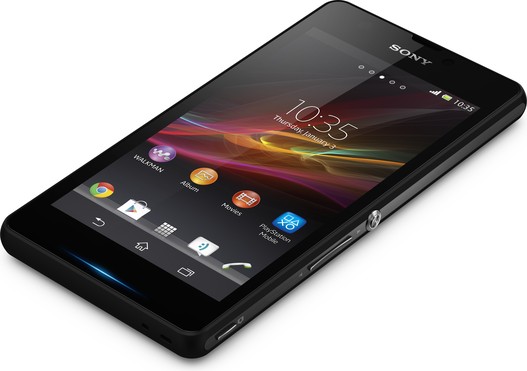
Sony Xperia L LTE C2105 Jelly Bean 4 2 2 Tested Firmware
Sony Xperia L LTE C2105 Jelly Bean 4 2 2 Tested Firmware
You can use the firmware for flash or reset screen lock 100% tested.
Mobile : Xperia L LTE
Model : C2105
System Version : Jelly Bean 4.2.2
Baseband : 15.3.A.1.17 Customized MEA
Mobile : Xperia L LTE
Model : C2105
System Version : Jelly Bean 4.2.2
Baseband : 15.3.A.1.17 Customized MEA
download link:
C2105_15.3.A.1.17_Customized_MEA--www.SamSony.net--.rar - 663.31 MB
flash tool:
https://mega.nz/#!z4sSTaQZ!BVO7GSmoTrTwuuJAhadVCO6LQqLXMF543teobwpDG-I
download mode (power off device volume down+plug usb)
Available link for download
Sony Xperia J ST26a Jelly Bean 4 1 2 Tested Firmware
Sony Xperia J ST26a Jelly Bean 4 1 2 Tested Firmware
You can use the firmware for flash or reset screen lock 100% tested.
Mobile : Xperia J
Model : ST26a
System Version : Jelly Bean 4.1.2
Baseband : 11.2.A.0.31

Mobile : Xperia J
Model : ST26a
System Version : Jelly Bean 4.1.2
Baseband : 11.2.A.0.31
download link:
ST26a_11.2.A.0.31--www.SamSony.net--.ftf - 695.61 MB
flash tool:
https://mega.nz/#!z4sSTaQZ!BVO7GSmoTrTwuuJAhadVCO6LQqLXMF543teobwpDG-I
download mode (power off device volume down+plug usb)
Available link for download
Sunday, August 21, 2016
Sony Xperia ION LT28h Jelly Bean 4 1 2 Tested Firmware
Sony Xperia ION LT28h Jelly Bean 4 1 2 Tested Firmware
You can use the firmware for flash or reset screen lock 100% tested.
Mobile : Xperia ION
Model : LT28h
System Version : Jelly Bean 4.1.2
Baseband : 6.2.B.0.211 Customized MEA

Mobile : Xperia ION
Model : LT28h
System Version : Jelly Bean 4.1.2
Baseband : 6.2.B.0.211 Customized MEA
download link:
LT28h_6.2.B.0.211_Customized_MEA--www.SamSony.net--.rar - 508.01 MB
flash tool:
https://mega.nz/#!z4sSTaQZ!BVO7GSmoTrTwuuJAhadVCO6LQqLXMF543teobwpDG-I
download mode (power off device volume down+plug usb)
Available link for download
Saturday, August 20, 2016
Sony Xperia GO ST27i Jelly Bean 4 1 2 Tested Firmware
Sony Xperia GO ST27i Jelly Bean 4 1 2 Tested Firmware
You can use the firmware for flash or reset screen lock 100% tested.
Mobile : Xperia GO
Model : ST27i
System Version : Jelly Bean 4.1.2
Baseband : 6.2.A.1.100 Customized MEA

Mobile : Xperia GO
Model : ST27i
System Version : Jelly Bean 4.1.2
Baseband : 6.2.A.1.100 Customized MEA
download mode:
ST27i_6.2.A.1.100_Customized_MEA--www.SamSony.net--.rar - 609.47 MB
flash file:
https://mega.nz/#!z4sSTaQZ!BVO7GSmoTrTwuuJAhadVCO6LQqLXMF543teobwpDG-I
download mode (power off device volume down+plug usb)
Available link for download
Subscribe to:
Posts (Atom)