Showing posts with label tutorial. Show all posts
Showing posts with label tutorial. Show all posts
Friday, September 9, 2016
HTC Gold card maker Root Tutorial Official rom flashing important note Easy Way to find yur Correct firmware for yur model
HTC Gold card maker Root Tutorial Official rom flashing important note Easy Way to find yur Correct firmware for yur model
Imp Notes :

* To update vit official Rom yu hav to relock yur bootloader nd update yu mobile relock command below do it on fastboot mode
* if yu are unlocked yur bootloader yu can not flash yur mobile using official ROMS.
* To update vit official Rom yu hav to relock yur bootloader nd update yu mobile relock command below do it on fastboot mode
fastboot oem lock
* If yu have unlocked rooted nd custom recovery installed in yur mobile yu can flash custom roms nd other rom zip files using it.
* To update original Rom after relocked in fastboot mode check yur cid use **** command
fastboot getvar cid
* To update original Rom after relocked in fastboot mode check yur cid use **** command
fastboot getvar cid
* Yur cid must b lik this example: cid:HTC__044
* if get the cid yu can search correct rom for yur model vit this cid for examble se picr below.
official roms vist here

* if yu unable to find the correct rom for ur cid yu can upadte yur mob by 2 methods 1st is goldcard method 2nd s-off yur mob nd update vit any rom.
* Gold card method 1st post
* For s-off method yu hav to unlock yur bootloader nd root yur mobile den search for s-off locking tool for yur hboot version.once if yu s-off yur mobile yu can flash any official rom but before update yu hav to agin relock the bootloader.
* CID change benefits if yur on s-off change yur cid as super cid Normal cid HTC__044 super cid 111111 yu can edit cid by some tools yu can search it for yu
model via google.
* Once yu get the super cid yu can flash any rom any time but yu can not downgrade if yu need to downgrade yu hav to s-off yur mob.one more thing wen
yur mob on s-off yu can oly flash other official rom once aftr update yur s-off become s-ON. if yu hav change yur cid to super cid no need to wrry about it.
Easy Way to find yur Correct firmware for yur model
* put yur mob into fastboot mode nd cnnt it to the pc
* Run cmd command type fastboot getvar all nd press enter
* After get full details about yur mobile follw the below givn image
* if get the cid yu can search correct rom for yur model vit this cid for examble se picr below.
official roms vist here
* if yu unable to find the correct rom for ur cid yu can upadte yur mob by 2 methods 1st is goldcard method 2nd s-off yur mob nd update vit any rom.
* Gold card method 1st post
* For s-off method yu hav to unlock yur bootloader nd root yur mobile den search for s-off locking tool for yur hboot version.once if yu s-off yur mobile yu can flash any official rom but before update yu hav to agin relock the bootloader.
* CID change benefits if yur on s-off change yur cid as super cid Normal cid HTC__044 super cid 111111 yu can edit cid by some tools yu can search it for yu
model via google.
* Once yu get the super cid yu can flash any rom any time but yu can not downgrade if yu need to downgrade yu hav to s-off yur mob.one more thing wen
yur mob on s-off yu can oly flash other official rom once aftr update yur s-off become s-ON. if yu hav change yur cid to super cid no need to wrry about it.
Easy Way to find yur Correct firmware for yur model
* put yur mob into fastboot mode nd cnnt it to the pc
* Run cmd command type fastboot getvar all nd press enter
* After get full details about yur mobile follw the below givn image
Code:
All cid codes


Cid id and oparetors all htc
SuperCID 11111111
AirTel-India ????????
Asia-HK-CHT HTC__622
ATT CWS__001
BM BM___001
Bouygues-Telecom BOUYG201
Brightstar-PTB BSTAR502
Brightstar-SPA BSTAR301
Chunghwa-Taiwan CHT__601
CT HTCCN702
CU HTCCN703
DCM DOCOM801
DOPOD DOPOD701
Era T-MOB009
Fastweb-IT FASTW401
GOOGLE GOOGL001
H3G-DAN H3G__F05
H3G-Italy H3G__402
H3G-ROI H3G__003
H3G-SWE H3G__G04
H3G-UK H3G__001
HTC-Asia-SEA HTC__037
HTC-Asia-SEA-WWE HTC__044
HTC-Australia HTC__023
HTC-BE HTC__E41
HTC-Czech HTC__C24
HTC-Denmark HTC__F08
HTC-Dutch HTC__E11
HTC-EastEurope HTC__032
HTC-ELL HTC__N34
HTC-FRA HTC__203
HTC-FRA-Bouygues HTC__247
HTC-GCC HTC__J15
HTC-GER HTC__102
HTC-India HTC__038
HTC-ITA HTC__405
HTC-Nor HTC__Y13
HTC-Norway HTC__H10
HTC-Poland HTC__B25
HTC-PTG HTC__506
HTC-Russia HTC__A07
HTC-Singapore ????????
HTC-SPA HTC__304
HTC-Sweden HTC__G09
HTC-Turkey HTC__M27
HTC-WWE HTC__001
Hutch-Australia HUTCH001
O2-DE O2___102
O2-UK O2___001
Open-Channel HTCCN701
Optus-Australia OPTUS001
ORANGE-AT ORANG113
ORANGE-BE ORANG012
ORANGE-CH-FRA ORANG203
ORANGE-CH-GER ORANG104
ORANGE-ES ORANG309
ORANGE-French ORANG202
ORANGE-PL ORANGB10
ORANGE-PO ORANG008
ORANGE-SK ORANG006
ORANGE-UK ORANG001
Rogers ROGER001
SMC-Voda-HK SMCVD001
StarHub-Singapore ????????
TELEF-Spain TELEF301
Telstra TELST001
TELUS TELUS001
TIM-Italy TIM__401
TMA T-MOB102
TMCZ T-MOB004
TMD T-MOB101
TMH T-MOB007
TMHR T-MOB006
TMMK T-MOBL11
TMNL T-MOB003
TMSK T-MOB008
TMUK T-MOB005
TMUS T-MOB010
TWM-TW HTC__621
VIRGIN-UK VIRGI001
VODA-Africa-South HTC__016
VODA-Australia VODAP021
VODA-Germany VODAP102
VODA-Greece VODAP006
VODA-Ireland VODAP019
VODA-Italy VODAP405
VODA-Mobilkom VODAP120
VODA-Netherland VODAPE17
VODA-New-Zealand VODAP022
VODA-Portugal VODAPD18
VODA-Proximus VODAP024
VODA-SA VODAP026
VODA-SFR VODAP203
VODA-Spain VODAP304
VODA-Swisscom-DE VODAP110
VODA-Swisscom-FR VODAP212
VODA-Swisscom-IT VODAP416
VODA-Swisscom-WWE VODAP015
VODA-TR VODAPM27
VODA-UK VODAP001
Available link for download

Thursday, September 1, 2016
All about HTC Gold card maker Root Tutorial Official rom flashing important notes
All about HTC Gold card maker Root Tutorial Official rom flashing important notes
Goldcard making tutorial
* Download & install adb fastbood driver Here(no need to Download crap android SDK)
* If you install this Driver yu can launch adb command from anywhere
* Download this simplegoldcard maker
* Take a memory card nd format usng FAT32.
* Enable usb debugging n yur mobile
* Connect it to the pc
* Run the SimpleGoldCard
* Now do like **** given n the pictures

* Click here to download yur goldcard image fileclick me

* after got goldcard img follw the picture below

* Put yur gold card memmory to yur mobile
* Download nd flash any official RUU on yur mobile vit out errors.
procedure 2 get cid using command
* Enable usb debugging
* connect it to yur pc
* Run cmd the type[ adb devices ] press enter
* if yur mob is cnnted correctly yu sud see lik below given n the picture

* Then type [adb shell] press enter
* Type [cat /sys/class/mmc_host/mmc1/mmc1:*/cid ] press enter (low end mobiles must hav memory card inserted)
above doest work tye this [ cat /sys/class/mmc_host/mmc0/mmc0:*/cid ] press enter picture below

* After get the CID go to this site to generate yur gold card image filePress me
* Note this is not reversed CID its Normal Cid so enter the CID into normal CID box picture below

* after generate the goldcard img use simple goldcard maker tool to create gold card folow above procedure
I made this Thread more easier for newbies Njoy
Rooting + Bootloader unlocking &Custom recovery
* Make sure your phone is at least 60% charged.
* Register for an account at HTCdev.
* Enable USB debugging in your phones Developer options.
* Un-check "Fast boot" on your phone by going to Settings -> Battery Manager.
* Install ADB and Fastboot on your computer.Download here
* Make sure to back up all of your app data using either ADB or HTC Sync, because you will be wiping your phone.
* Install the HTC One M8 drivers on your computer (if you have HTC Sync installed, then you already have them).
1st Unlock Your Bootloader
Step 1: Enter Fastboot Mode Place your device into fastboot mode by plugging in your HTC One to your computer, then powering it down by holding both the Power and Volume Down buttons until you see the screen below.
Step 2: Run cmd command there enter below given command nd press enter
* Download & install adb fastbood driver Here(no need to Download crap android SDK)
* If you install this Driver yu can launch adb command from anywhere
* Download this simplegoldcard maker
* Take a memory card nd format usng FAT32.
* Enable usb debugging n yur mobile
* Connect it to the pc
* Run the SimpleGoldCard
* Now do like **** given n the pictures
* Click here to download yur goldcard image fileclick me
* after got goldcard img follw the picture below
* Put yur gold card memmory to yur mobile
* Download nd flash any official RUU on yur mobile vit out errors.
procedure 2 get cid using command
* Enable usb debugging
* connect it to yur pc
* Run cmd the type[ adb devices ] press enter
* if yur mob is cnnted correctly yu sud see lik below given n the picture
* Then type [adb shell] press enter
* Type [cat /sys/class/mmc_host/mmc1/mmc1:*/cid ] press enter (low end mobiles must hav memory card inserted)
above doest work tye this [ cat /sys/class/mmc_host/mmc0/mmc0:*/cid ] press enter picture below
* After get the CID go to this site to generate yur gold card image filePress me
* Note this is not reversed CID its Normal Cid so enter the CID into normal CID box picture below
* after generate the goldcard img use simple goldcard maker tool to create gold card folow above procedure
I made this Thread more easier for newbies Njoy
Rooting + Bootloader unlocking &Custom recovery
* Make sure your phone is at least 60% charged.
* Register for an account at HTCdev.
* Enable USB debugging in your phones Developer options.
* Un-check "Fast boot" on your phone by going to Settings -> Battery Manager.
* Install ADB and Fastboot on your computer.Download here
* Make sure to back up all of your app data using either ADB or HTC Sync, because you will be wiping your phone.
* Install the HTC One M8 drivers on your computer (if you have HTC Sync installed, then you already have them).
1st Unlock Your Bootloader
Step 1: Enter Fastboot Mode Place your device into fastboot mode by plugging in your HTC One to your computer, then powering it down by holding both the Power and Volume Down buttons until you see the screen below.
Step 2: Run cmd command there enter below given command nd press enter
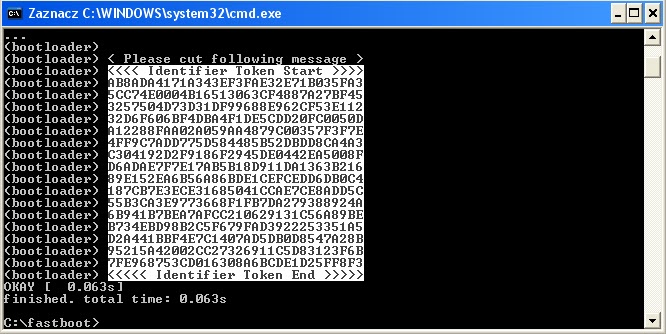
fastboot oem get_identifier_token
Step 3: Copy the TokenNow copy the code you get, but do not include the first (bootloader) portions.To copy the token right click on it select mark den press ctrl+v n yur keyboard to copy the token.
Step 4: Log into HTCdev
Go to HTCdev and log in to your account.
Step 5: Get Your Code Emailed to You
Select Unlock Bootloader and then Get Started.

From the drop-down menu, select HTC One (M8) (or just HTC One for the older M7 model, if thats what youre unlocking), then click on Begin Unlock Bootloader.
Agree to the terms and conditions and click Proceed to Unlock. On the next page, scroll all the way down and click on Proceed to Step 5.

Available link for download
Wednesday, August 31, 2016
Tutorial Create sony ftf flash files by yur own tested firmware Downloader included 2014
Tutorial Create sony ftf flash files by yur own tested firmware Downloader included 2014

Tutorial Create sony ftf flash files by yur own
Tutorial


Firmware Downloader
Flash tool Download
Flash tool Download
Tutorial
Available link for download
Friday, August 26, 2016
Tutorial Flashing Xperia J Menggunakan Flashtool
Tutorial Flashing Xperia J Menggunakan Flashtool

Bahan-bahan yang perlu disiapkan:
1. Firmware- ST26i_11.0.A.3.18_Global.ftf
- ST26i_11.0.A.3.28_WE.ftf
- ST26i_11.0.A.7.5_CE.ftf
- ST26i_11.2.A.0.21_No brand ITA.ftf
- St26i_11.2.A.0.31_Central Europa.zip
3. Flashtools, download disini
Cara Termudah Meng-Instal Flashtool

Download
Buka file hasil download-an tadi. Install program seperti biasa. Kalo bingung, lihat gambar di bawah:


Install Flashtool selesai, sekarang tinggal install driver nya:
- Masuk ke folder C:/Flashtool/drivers/
- Kamu akan nemu file "Flashtool-drivers.exe"
- Buka file tersebut
- Nanti muncul penampakkan seperti di bawah
- Ikuti saja petunjuknya, tinggal next-next aja kok

Centang saja semua pilihannya


Tanda sedang menginstal driver

Nanti bakal banyak sekali penampakkan seperti gambar di bawah, klik Install/Allow/OK aja yah. Pokoknya jangan sampe ditolak.
 Tanda driver sudah terinstall semuanya
 Nah, sekarang Flashtool Anda udah siap digunakan..
 Mungkin cuma itu saja tentang Cara Termudah Meng-Instal Flashtool
Semoga Bermanfaat!
Langkah langkah
Pertama, Copy firmware hasil downloadan tadi ke folder C:/Flashtool/Firmware.
Kedua, Jalankan flashtool,

klik flash, pilih firmware Xperia J (ST26i), klik tombol OK.

Ketiga, matikan ponsel Anda, lalu sambil mencolokkan USB cable, tahan volume down.
Pastikan LED menyala warna HIJAU

Keempat, Tunggu saja sampai proses flashing selesai


Catatan:
Pastikan file yg didownload adalah ftf (jika masih dalam winrar, file ftf ny di ektrak dahulu) dan telah didownload dengan sempurna.
Available link for download
Subscribe to:
Posts (Atom)